Shmeppy is an online map-making tool for tabletop RPGs. One person (the GM) draws the map in real time while everyone else watches and interacts with it. This guide will walk you through the basics.
Creating an Account
Go to shmeppy.com and click “Try Shmeppy” or “Log In”. Create an account with your email address.
GMs need a subscription to create and edit maps. Players can join for free.
Creating a Game
After logging in, click “New Game” in the sidebar on the left. This creates a new game with a blank map that you can start drawing on right away.
Inviting Players
Share the URL in your browser’s address bar with your players. When they open the link, they’ll join the game and see your map in real time. That’s it — no invite codes or friend requests needed.
Players on phones or tablets can use the same link. They’ll automatically get a touch-optimized interface.
The Interface
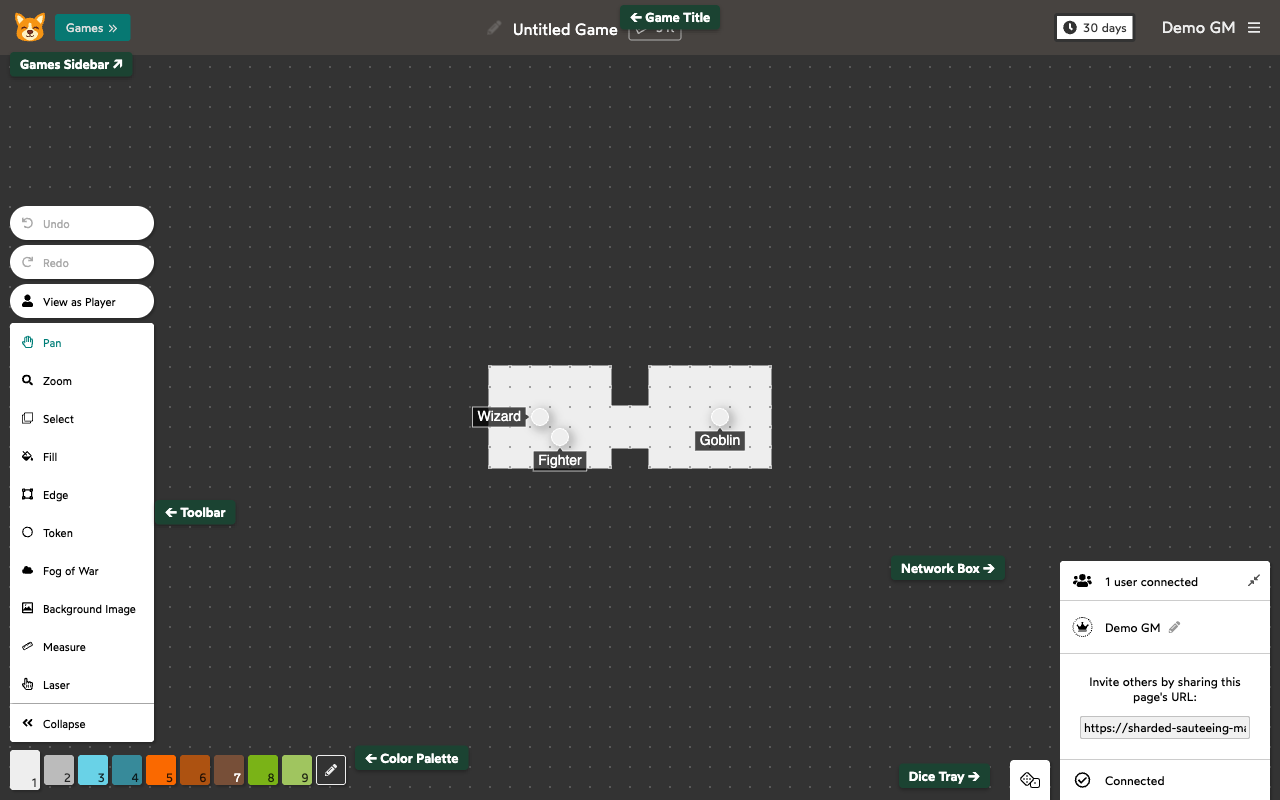
The main areas of the screen:
- Toolbar (left side): Your drawing tools. Hover over any tool to see what it does and its keyboard shortcut.
- Color Palette (below toolbar): Pick colors for the Fill and Edge tools.
- Games Sidebar (top-left): Your list of games and maps. Click “Games” to open it.
- Dice Tray (bottom-right): A shared dice roller for the table.
- Network Box (bottom-right): Shows who’s connected to the game.
Drawing Your First Map
The quickest way to get a map going:
- Select the Fill tool (press
f) and click-drag to paint floor tiles. - Select the Edge tool (press
e) and click cell borders to draw walls. - Select the Token tool (press
t) and click to place tokens for characters and monsters.
All your changes are synced to connected players instantly.
GM vs Player
The person who creates a game is its GM. A game can have multiple GMs.
GMs can:
- Draw and erase with all tools (Fill, Edge, Fog of War, Background Image, etc.).
- Create, edit, resize, and delete tokens.
- Hide areas from players with Fog of War.
- Add GM-only labels to tokens that players can’t see.
- Edit the color palette.
- Manage maps (create, rename, archive, delete).
Players can:
- Move tokens.
- Use the Laser to point at things on the map.
- Pan and zoom around the map.
- Measure distances.
- Roll dice.
Communicating with Players
Shmeppy doesn’t have built-in voice or text chat. Most groups use Discord or another voice chat alongside Shmeppy.
Undo and Redo
Made a mistake? Press Ctrl+Z (or Command+Z on Mac) to undo. Press Ctrl+Shift+Z (or Command+Shift+Z) to redo.
Next Steps
Check out the tool-specific guides in the Helpdesk Articles for detailed walkthroughs of each tool.
You can also hover over any tool in the toolbar to see a quick summary of what it does and how to use it.