johncs
1
A quick reference for all of Shmeppy’s keyboard shortcuts.
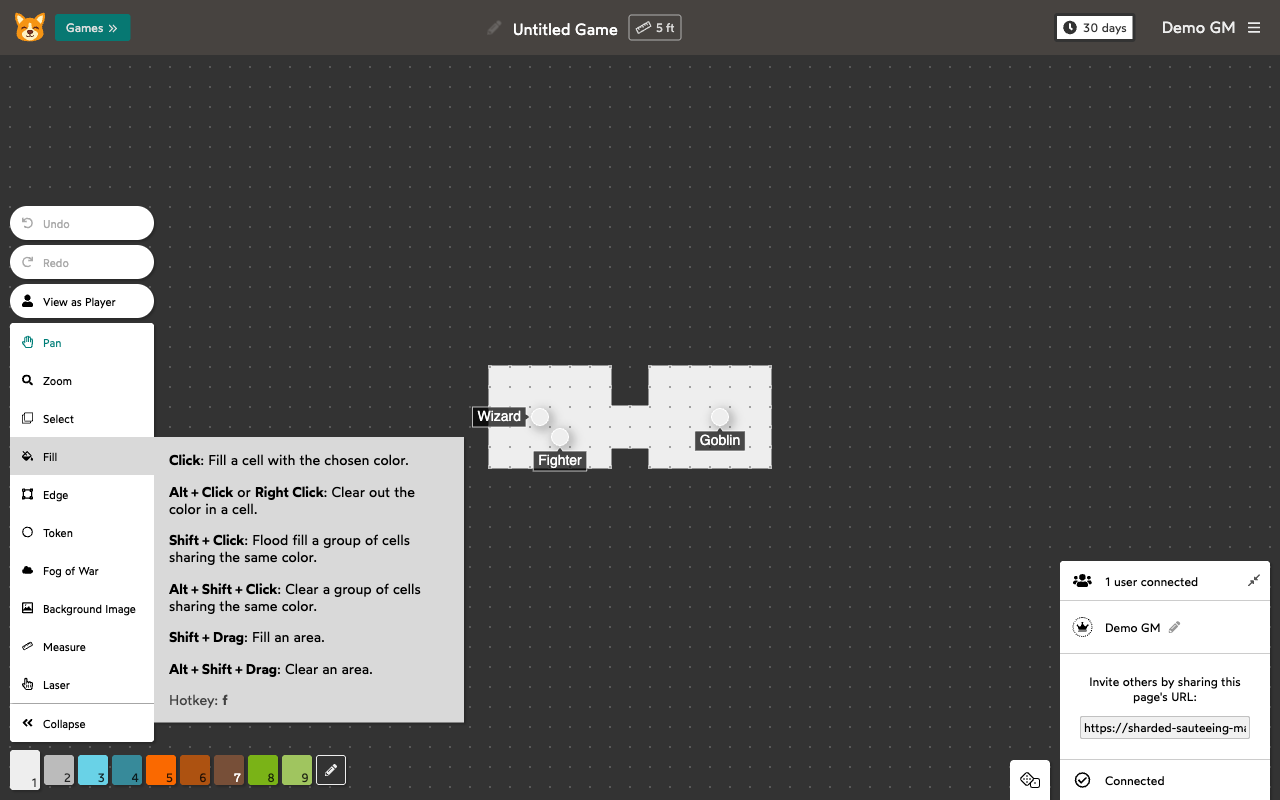
You can also see a tool’s shortcuts by hovering over it in the toolbar:
Tool Selection
| Shortcut |
Tool |
f |
Fill |
e |
Edge |
t |
Token |
w |
Fog of War |
q |
Background Image |
c |
Select |
s |
Measure |
a |
Pan |
z |
Zoom |
spacebar |
Laser |
General
| Shortcut |
Action |
Ctrl+Z / Command+Z |
Undo |
Ctrl+Shift+Z / Command+Shift+Z |
Redo |
Ctrl+V / Command+V |
Paste |
Escape |
Clear selection or cancel current action |
v |
Toggle View as Player (GM only) |
Token Tool
| Shortcut |
Action |
g |
Toggle Snap to Grid |
Click empty cell |
Create token |
Alt+Click / Right Click |
Delete token |
Double Click |
Edit token label |
Tab (while editing) |
Switch to GM-only label |
Shift+Click token |
Add token to selection |
Shift+Drag edge |
Resize or rotate token |
Arrow Keys |
Move selected token(s) |
Ctrl+C / Command+C |
Copy selected tokens |
Ctrl+V / Command+V |
Paste |
Ctrl+A / Command+A |
Select all tokens |
Delete / Backspace |
Delete selected tokens |
Fill Tool
| Shortcut |
Action |
Click / Drag |
Fill cell(s) |
Alt+Click / Right Click |
Clear cell |
Shift+Click |
Flood fill same-colored group |
Alt+Shift+Click |
Clear same-colored group |
Shift+Drag |
Fill an area (rectangle or ellipse) |
Alt+Shift+Drag |
Clear an area |
Edge Tool
| Shortcut |
Action |
Click / Drag |
Draw edge(s) |
Alt+Click / Right Click |
Clear edge |
Shift+Click |
Outline same-colored group |
Alt+Shift+Click |
Clear outline of same-colored group |
Shift+Drag |
Fill edges in an area |
Alt+Shift+Drag |
Clear edges in an area |
Select Tool
| Shortcut |
Action |
Click |
Select cell |
Alt+Click / Right Click |
Deselect cell |
Shift+Drag |
Select rectangle |
Alt+Shift+Drag |
Deselect rectangle |
Arrow Keys |
Move selection |
| Drag selected cell |
Move selection |
Ctrl+C / Command+C |
Copy selection |
Ctrl+V / Command+V |
Paste |
Ctrl+A / Command+A |
Select all |
Delete / Backspace |
Delete selection |
Fog of War Tool
| Shortcut |
Action |
Click / Drag |
Hide cell(s) from players |
Alt+Click / Right Click |
Reveal cell to players |
Shift+Click |
Hide same-colored group |
Alt+Shift+Click |
Reveal same-colored group |
Shift+Drag |
Hide rectangle |
Alt+Shift+Drag |
Reveal rectangle |
Background Image Tool
| Shortcut |
Action |
Click empty cell |
Upload image |
Double Click |
Show resize popup |
Alt+Click / Right Click |
Delete image |
Drag |
Move image (keeps grid alignment) |
Shift+Drag |
Adjust grid alignment |
Shift+Drag edge |
Resize image |
Measure Tool
| Shortcut |
Action |
Drag |
Measure distance (snaps to cell centers) |
Shift+Drag |
Measure distance (no snapping) |
Click |
Add waypoint for multi-segment measurement |
Escape / Right Click / Alt+Click |
Clear waypoints |
Pan and Zoom (work with any tool)
| Shortcut |
Action |
Middle Click + Drag |
Pan |
Ctrl+Scroll / Command+Scroll |
Zoom |
| Pinch (trackpad) |
Zoom |
Color Palette
| Shortcut |
Action |
1 through 9 |
Select palette color by position |
Ctrl+D / Command+D |
Eyedropper: pick color under mouse |