The person who creates a game is its GM. A game can have multiple GMs. Everyone else who joins via the game link is a player.
GMs and players have different tools and abilities.
GM Tools
GMs have the full toolbar and can:
- Draw and erase with the Fill, Edge, and Fog of War tools.
- Create, edit, resize, rotate, and delete tokens. This includes setting labels, GM-only labels, token images, shapes, and visibility.
- Upload and manage background images.
- Hide areas from players using Fog of War.
- Edit the color palette.
- Manage games and maps — create, rename, archive, duplicate, export, and delete.
- View as Player to preview what players see (press
vor click the button).
Player Tools
Players have a smaller toolbar with only the tools they need:
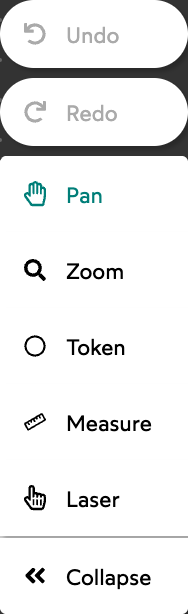
Players can:
- Move tokens by dragging them. Players cannot create, delete, resize, or edit tokens.
- Pan and zoom around the map.
- Measure distances with the Measure tool.
- Point at things with the Laser tool.
- Roll dice using the Dice Tray.
Players cannot draw, erase, use Fog of War, upload background images, edit the palette, or manage games.
View as Player
GMs can preview what their players see by pressing v or clicking the “View as Player” button. This shows the map without Fog of War hidden areas and without GM-only labels. Press v again or click “View as GM” to switch back.